> ## Documentation Index
> Fetch the complete documentation index at: https://docs.fapshi.com/llms.txt
> Use this file to discover all available pages before exploring further.
# Webhook Integration
> Learn how to integrate webhooks to receive real-time payment status updates from Fapshi.
A webhook is an API endpoint made available to external applications that can be called to notify your application whenever a significant event occurs. This allows your app to react or respond immediately to these events.
You can set a webhook URL per service on your Fapshi dashboard. When set, a **POST** request will be sent to this webhook URL whenever the status of a payment changes to:
* **SUCCESSFUL** — when a payment attempt completes successfully
* **FAILED** — when a payment attempt fails (usually on operator networks like MTN Mobile Money or Orange Money)
* **EXPIRED** — when a payment link expires after 24 hours without successful payment
The payload of the webhook request will be the same as the response body returned when [querying a payment status](/en/api-reference/endpoint/payment-status).
## How Webhooks Work
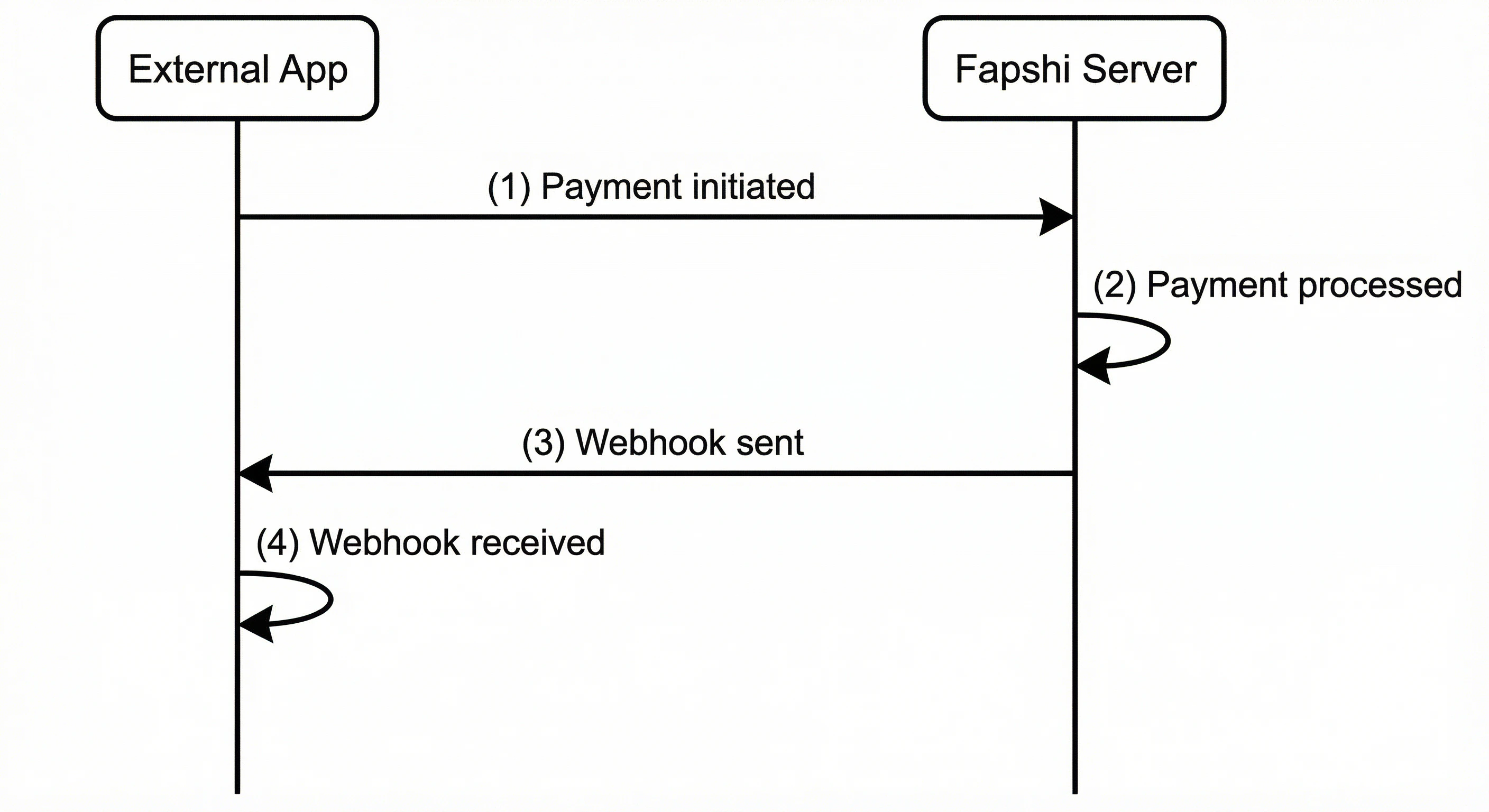 1. **Payment Initiated**: Your external application initiates a payment by calling one of Fapshi's payment endpoints (e.g., [initiate-pay](/en/api-reference/endpoint/initiate-pay) or [direct-pay](/en/api-reference/endpoint/direct-pay)).
2. **Payment Processed**: Fapshi Server processes the payment transaction. This includes handling the payment flow, communicating with payment operators, and updating the transaction status.
3. **Webhook Sent**: When the payment status changes to SUCCESSFUL, FAILED, or EXPIRED, Fapshi Server automatically sends a POST request to your configured webhook URL with the updated transaction details.
4. **Webhook Received**: Your external application receives the webhook notification and can process it accordingly (e.g., update your database, send notifications, trigger other workflows).
Your server should respond quickly to webhook requests to avoid timeouts, ideally with a 200 status code. Fapshi sends only one webhook request per event, regardless of whether your server responds or not.
## Webhook Security
You can authenticate the origin of a webhook request by setting a webhook secret on the Fapshi dashboard. When a secret is configured, every webhook request includes a header called `x-wh-secret` whose value is the secret you set on the dashboard. Comparing the value in this header to the secret you configured tells you whether the request came from Fapshi.
As a security measure, the dashboard does not let you view or determine whether a webhook secret has already been set for a service.
## Webhook Payload Format
## OpenAPI
````yaml en/api-reference/openapi.json WEBHOOK /webhook/payment-status
openapi: 3.1.0
info:
title: Fapshi Payment API
description: >-
API for generating payment links, direct payments, transaction monitoring,
payouts, and more.
version: 1.0.0
servers:
- url: https://sandbox.fapshi.com
security:
- apiAuth: []
apiKey: []
paths: {}
components:
securitySchemes:
apiAuth:
type: apiKey
in: header
name: apiuser
apiKey:
type: apiKey
in: header
name: apikey
````
1. **Payment Initiated**: Your external application initiates a payment by calling one of Fapshi's payment endpoints (e.g., [initiate-pay](/en/api-reference/endpoint/initiate-pay) or [direct-pay](/en/api-reference/endpoint/direct-pay)).
2. **Payment Processed**: Fapshi Server processes the payment transaction. This includes handling the payment flow, communicating with payment operators, and updating the transaction status.
3. **Webhook Sent**: When the payment status changes to SUCCESSFUL, FAILED, or EXPIRED, Fapshi Server automatically sends a POST request to your configured webhook URL with the updated transaction details.
4. **Webhook Received**: Your external application receives the webhook notification and can process it accordingly (e.g., update your database, send notifications, trigger other workflows).
Your server should respond quickly to webhook requests to avoid timeouts, ideally with a 200 status code. Fapshi sends only one webhook request per event, regardless of whether your server responds or not.
## Webhook Security
You can authenticate the origin of a webhook request by setting a webhook secret on the Fapshi dashboard. When a secret is configured, every webhook request includes a header called `x-wh-secret` whose value is the secret you set on the dashboard. Comparing the value in this header to the secret you configured tells you whether the request came from Fapshi.
As a security measure, the dashboard does not let you view or determine whether a webhook secret has already been set for a service.
## Webhook Payload Format
## OpenAPI
````yaml en/api-reference/openapi.json WEBHOOK /webhook/payment-status
openapi: 3.1.0
info:
title: Fapshi Payment API
description: >-
API for generating payment links, direct payments, transaction monitoring,
payouts, and more.
version: 1.0.0
servers:
- url: https://sandbox.fapshi.com
security:
- apiAuth: []
apiKey: []
paths: {}
components:
securitySchemes:
apiAuth:
type: apiKey
in: header
name: apiuser
apiKey:
type: apiKey
in: header
name: apikey
````