> ## Documentation Index
> Fetch the complete documentation index at: https://docs.fapshi.com/llms.txt
> Use this file to discover all available pages before exploring further.
# Payment Links
> What are Payment Links and how can I use them?
***
No need to have a website to start selling online! Simply create a Fapshi payment link and send to your customers to instantly receive your payment. Fapshi currently allows you to create payment links and donation links. Each of these links have different use cases for which they are best suited. See the [How to know which link to choose](https://www.fapshi.com/en/products/payment-links) section below for details:
## Donation Link
This is best suited for donations, crowdfunding, group contributions, njangi's, and any form of payment that involves more than one person paying.
### How to Create a Donation Link
**Step 1:** Log into your dashboard and navigate to **Collections > Donations**.
**Step 2:** Click the "Create Donation link" button at the top right.
**Step 3:** Fill in the required details; you can select a fixed amount for the donation or select the "let the donor decide" option so the donor can decide what amount to donate. Even so, you can optionally set a minimum amount for the donation.
If you select the "Show donations" option, donors will be able to see those who have donated or contributed before them, the date/time, and the amounts paid.
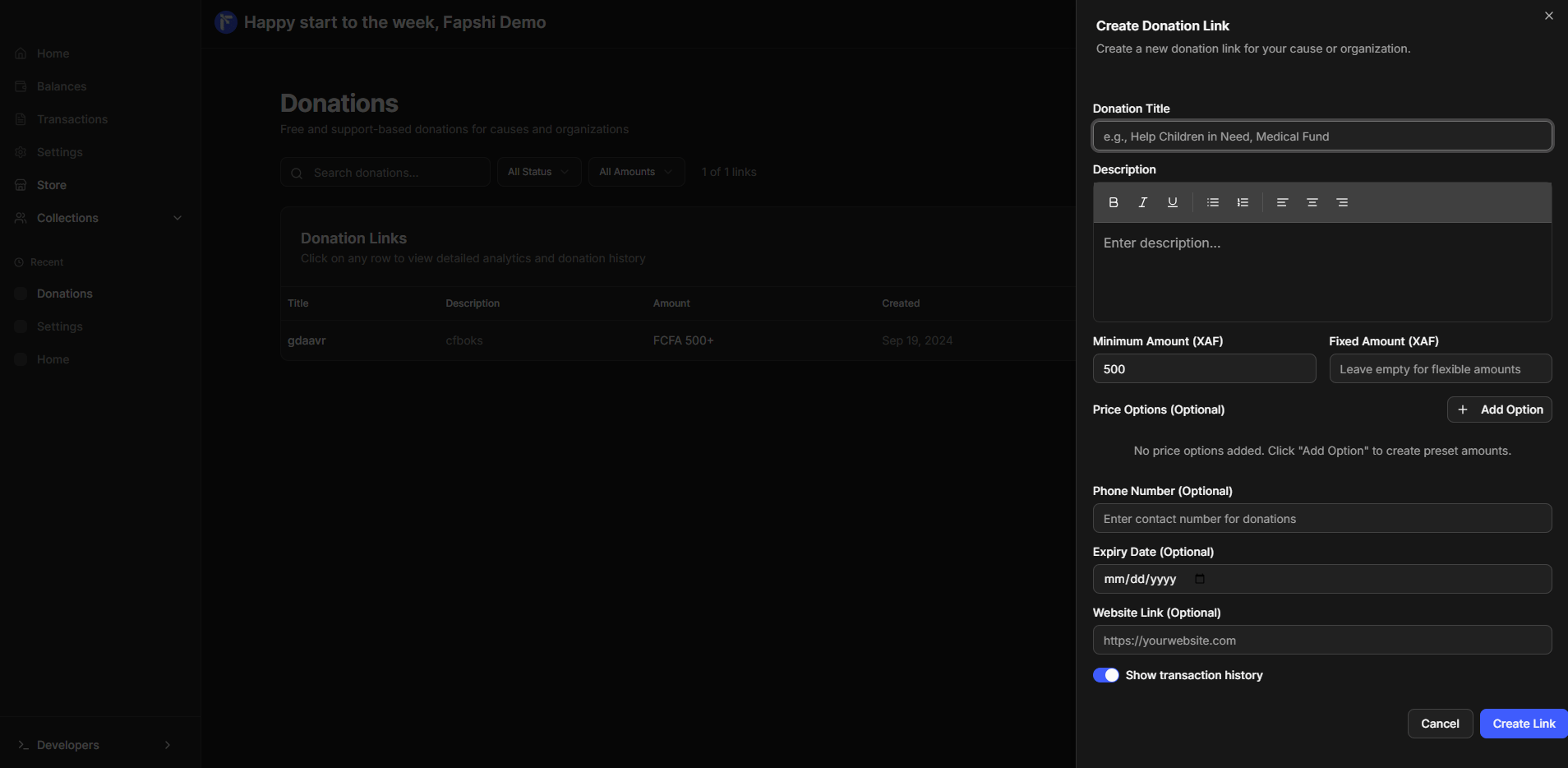 **Step 4:** Your payment link will be generated and you can copy and share with your donors!
**Step 5:** When donors click on the link, the Fapshi payment page will be displayed for them to pay.
**Step 6:** When someone pays, he/she will receive a payment receipt through his/her email and can download the receipt.
If you're using the mobile app, the options are the same. Open the **Collections** tab, select **Donations** and follow the same steps.
## Payment Link
Perfect for one-time payments, subscriptions with fixed prices, webinar fees, etc.
### How to Create a Payment Link
**Step 1:** Log into your dashboard and navigate to **Collections > Family & Friends**.
**Step 2:** Click the "Create a link" button at the top right.
**Step 3:** Fill in the required details; you must input an amount.
If you want to collect money for contributions, you should create a [Donation Link](#donation-link) instead.
**Step 4:** Your payment link will be generated and you can copy and share with your donors!
**Step 5:** When donors click on the link, the Fapshi payment page will be displayed for them to pay.
**Step 6:** When someone pays, he/she will receive a payment receipt through his/her email and can download the receipt.
If you're using the mobile app, the options are the same. Open the **Collections** tab, select **Donations** and follow the same steps.
## Payment Link
Perfect for one-time payments, subscriptions with fixed prices, webinar fees, etc.
### How to Create a Payment Link
**Step 1:** Log into your dashboard and navigate to **Collections > Family & Friends**.
**Step 2:** Click the "Create a link" button at the top right.
**Step 3:** Fill in the required details; you must input an amount.
If you want to collect money for contributions, you should create a [Donation Link](#donation-link) instead.
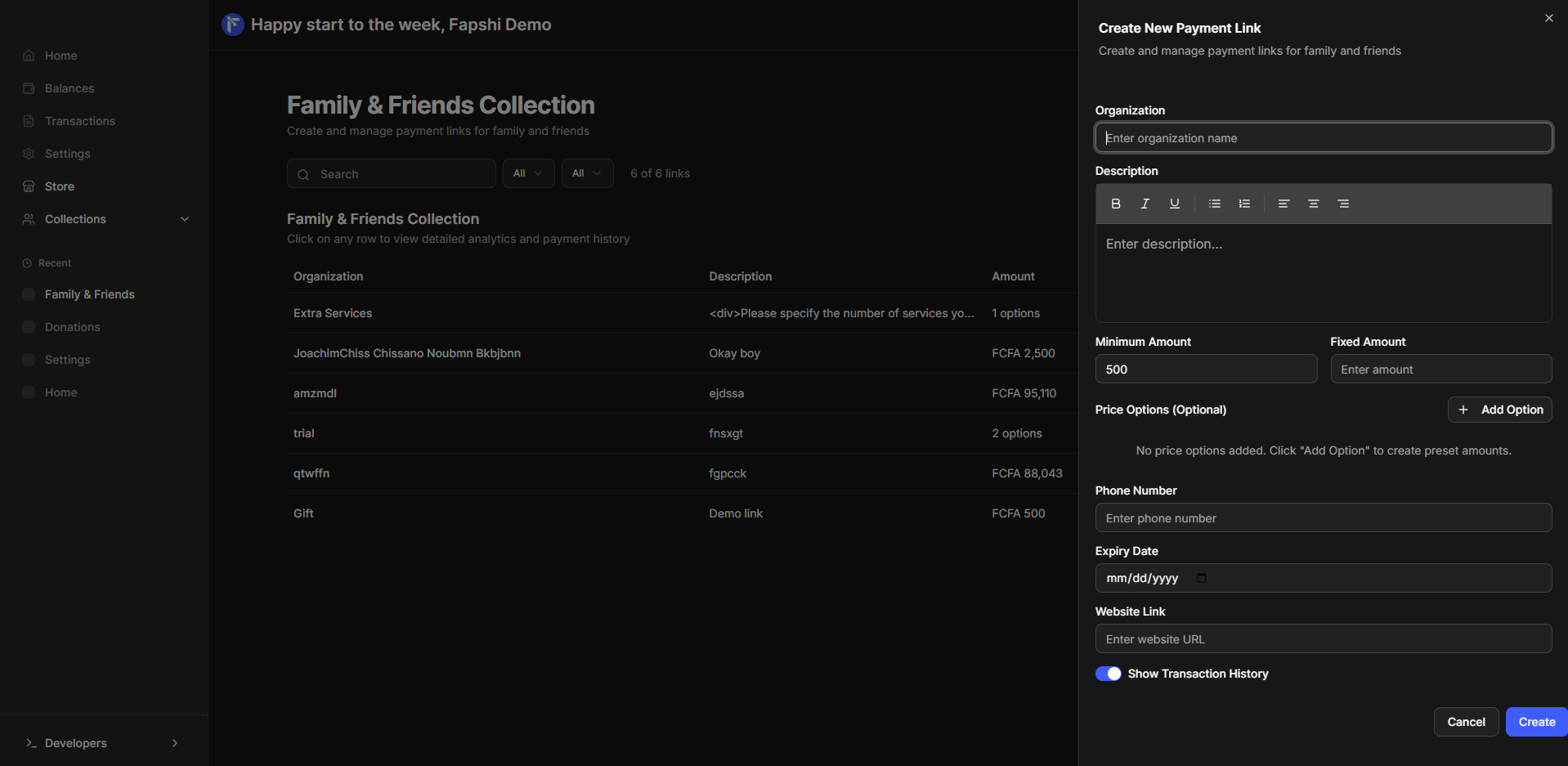 **Step 4:** Your payment link will be generated and you can copy and share with your client!
**Step 5:** When someone clicks the link, the Fapshi payment page will be displayed for them to pay.
**Step 6:** When your client pays, he/she will receive a payment receipt through his/her email and can download the receipt.
If you're using the mobile app, the options are the same. Open the **Collections** tab, select **Payment Link** and follow the same steps.
***
The minimum amount that can be paid through a payment link is **500 FCFA**.
You could set an expiry date after which no one could make payments through the payment link.
We charge a fee for payments made through payment links. Visit our [Pricing Calculator](https://fapshi.com/en/pricing#pricing-calculator) to see how much you'll be charged for the amount paid.
**Step 4:** Your payment link will be generated and you can copy and share with your client!
**Step 5:** When someone clicks the link, the Fapshi payment page will be displayed for them to pay.
**Step 6:** When your client pays, he/she will receive a payment receipt through his/her email and can download the receipt.
If you're using the mobile app, the options are the same. Open the **Collections** tab, select **Payment Link** and follow the same steps.
***
The minimum amount that can be paid through a payment link is **500 FCFA**.
You could set an expiry date after which no one could make payments through the payment link.
We charge a fee for payments made through payment links. Visit our [Pricing Calculator](https://fapshi.com/en/pricing#pricing-calculator) to see how much you'll be charged for the amount paid.